Home / Video & Motion / FilmCraft
FilmCraft: free alternative to Adobe Premiere Pro — online / desktop
Positioned against Premiere Pro. Maturity: in development. Our hands-on: the web build enters the full editing workspace with zero install (media pool + dual monitors + multi-track timeline + audio levels) — the form is professional; but the UI is in English, the 39 MiB first load is slow, and browser memory limits make it unsuitable for long-form work.
| Replaces | Adobe Premiere Pro |
|---|---|
| License | Apache-2.0 (commercial use OK) |
| Runs on | online / desktop |
| Chinese UI | no (English UI) |
| Where files go | On your device (not uploaded) |
| Cost | All features free; no subscription, no account (open source) |
| Hands-on test | 2026-10-21 · v0.10.0 |
Hands-on test (2026-10-21, v0.10.0)
- No-install entry to the full editing workspace: Media Pool asset pool, Effects Library, dual monitors (asset + timeline preview), multi-track timeline
- Timecodes verified: the preview area shows 00:00:04:04, and the total timeline length shows 00:00:35:18 (SMPTE format — proof the timeline is actually working)
- Audio level meters verified on the right side of the timeline (multiple colored level bars, usable to judge clipping); audio meter and master output at the top
- wasm measured at 39 MiB (~15 MiB gzipped) — exceeds the 25 MiB single-file limit of Cloudflare Pages
- 0 JS errors on launch; dual monitors and the timeline rendered normally
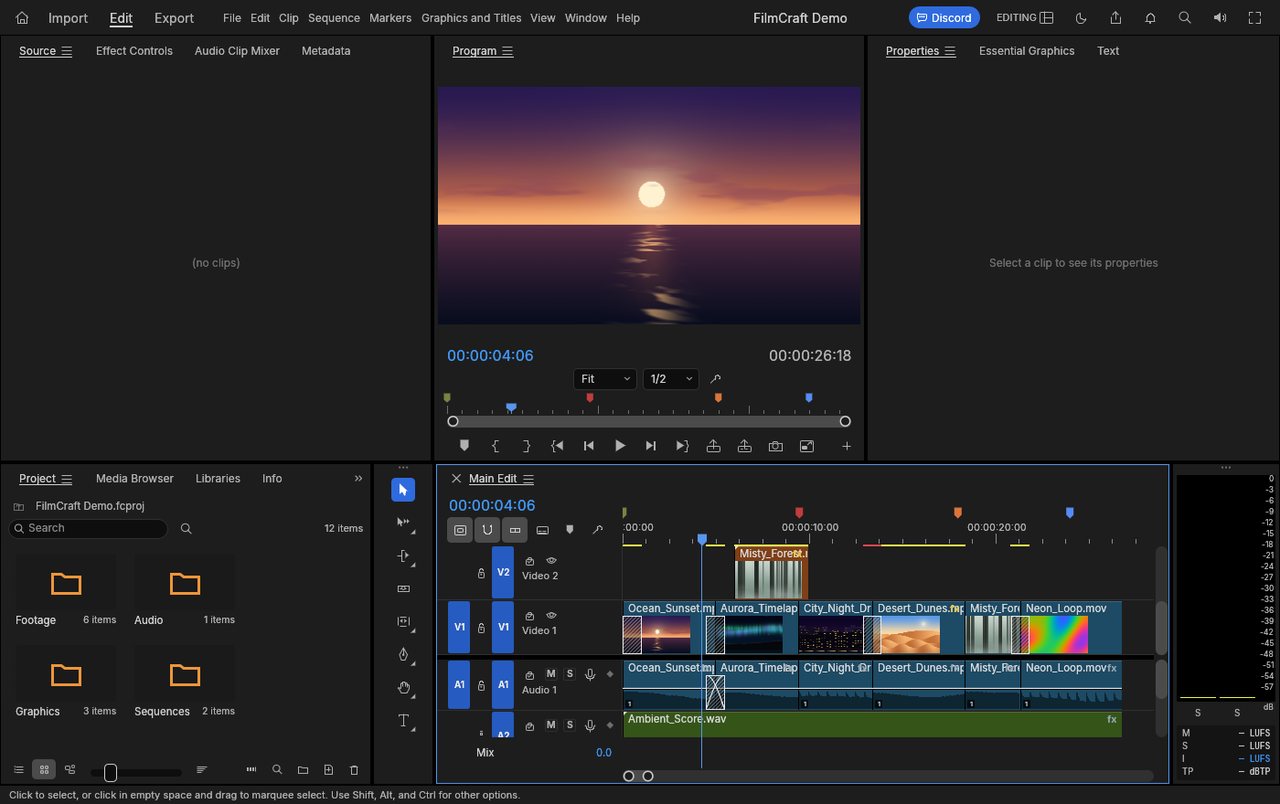
Bottom line: this is the closest to the form of a professional editing suite in this batch (dual monitors + SMPTE timecodes + audio level meters are hallmarks of pro software). But 'editing in the browser' itself has a memory ceiling — **good for short clips, not for long-form work**.
Best for
- Editing short videos/short dramas/interview clips; trying a PR-style workflow with zero install; can accept an English UI.
Not for
- 4K long-form work, multi-track professional audio, proxy workflows, interchanging with PR project files; scenarios constrained by browser memory.
Similar alternatives
How to get started
- Click "Use online" above — it runs in your browser, no signup required.
- Run the full workflow (open → edit → export) on a throwaway file first, to confirm format compatibility.
- Once you accept its limits, migrate your daily workflow; keep the original software as a fallback for critical deliverables.