Home / Image & Photo Editing / LightCraft
LightCraft: free alternative to Adobe Lightroom — desktop
Positioned against Lightroom. Maturity: in development. Our hands-on: the web build enters the full color-grading workspace with zero install — histogram, the five adjustment groups (Light/Color/Effects/Detail), the preset strip, and Copy Edit Settings are all there, and the workflow matches LR; but the UI is in English, and large-size/batch processing is constrained by browser memory.
| Replaces | Adobe Lightroom |
|---|---|
| License | Apache-2.0 (commercial use OK) |
| Runs on | desktop |
| Chinese UI | yes |
| Where files go | On your device (not uploaded) |
| Cost | All features free; no subscription, no account (open source) |
| Hands-on test | 2026-10-21 · v0.10.0 |
Hands-on test (2026-10-21, v0.10.0)
- No-install entry to the full color-grading workspace: photo preview in the center, histogram at the top right, five adjustment panels on the right, preset thumbnail strip at the bottom
- The five panel groups verified: Edit / Light / Color / Effects / Detail; the Light group shows sliders for Intensity, Clarity, Highlights, etc. (cross-checked against the screenshot)
- Preset thumbnail strip at the bottom (a row of preview images in different styles) + Copy Edit Settings button + Color / BW switch (bottom right)
- wasm measured at 24 MiB (~10 MiB gzipped) — just under the 25 MiB single-file limit of Cloudflare Pages
- 0 JS errors on launch; the photo and histogram rendered normally
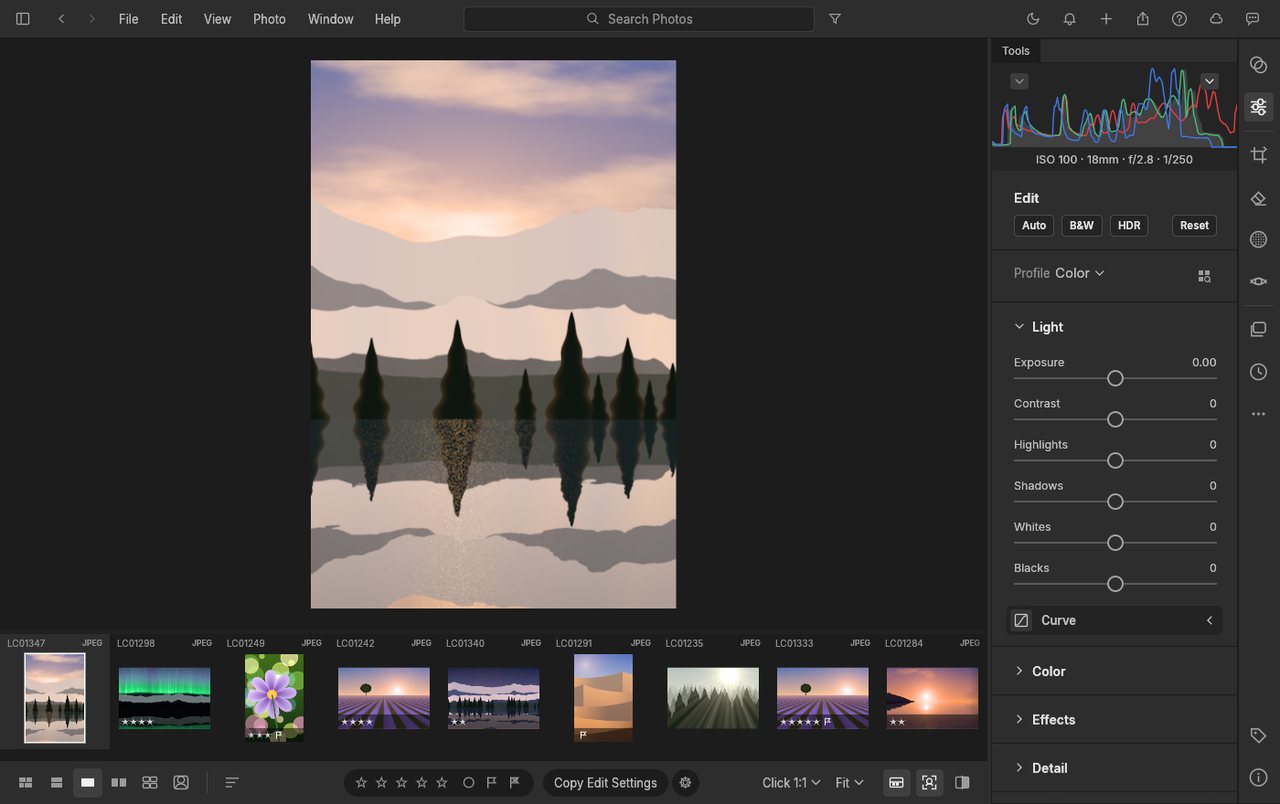
Bottom line: its core workflow matches Lightroom — read the histogram → adjust in the order Light/Color/Effects/Detail → batch-apply with Copy Edit Settings. For the most common need of 'unified color grading of travel/event photos', it is sufficient; for batch processing, install the desktop build.
Best for
- Unified color grading of travel/event/product photos; trying an LR-style workflow with zero install; batch processing of up to a dozen or so images.
Not for
- RAW format processing, thousands of images in batch, professional color management (colorimeter/ICC); scenarios requiring retouching (object removal / sky replacement) — use PhotoCraft for those.
Similar alternatives
How to get started
- Grab the installer from the official site (or use the official online build).
- Run the full workflow (open → edit → export) on a throwaway file first, to confirm format compatibility.
- Once you accept its limits, migrate your daily workflow; keep the original software as a fallback for critical deliverables.