PhotoCraft: A Free, Open-Source Adobe Photoshop Alternative
Aimed squarely at Photoshop. Layers / masks / adjustment layers / layer styles / type / vectors / brushes; reads and writes layered PSDs; native GPU canvas, works offline.
This is an independent third-party guide, not the official site; always use the official channels for downloads.
What is PhotoCraft
The most mature tool in the ArtCraft family: layers, masks, adjustment layers, layer styles, type, vectors, and brushes are all here, it reads and writes layered PSDs, uses a native GPU canvas, and works offline.
Can it replace Adobe Photoshop?
It is positioned as a direct competitor, but its current maturity is “early alpha”, so it is not a like-for-like replacement. It suits photographers, design students, and independent media creators who need retouching without an Adobe subscription, plus technical users who want to test whether open source can replace PS.
Our hands-on test (2026-10-21, official Web build v0.11.1)
This is not a rewrite of the official copy: we actually ran it. We downloaded the official Web (WebAssembly) build photocraft-web-0.11.1 and opened it in a local browser, with nothing to install.
- New document: Ctrl+N opens the full “New Document” dialog (Recent / Photo / Print / Web / Mobile / Film & Video presets, with width, height, resolution, colour mode, and background contents all present), and it produced a real 1920×1080 document with a Background layer in the Layers panel.
- Opening a real PSD: we loaded a PSD containing a text layer and layer styles; the Layers panel correctly identified the Type Layer, the properties panel showed that layer's Transform, and the text's gradient and stroke rendered in full.
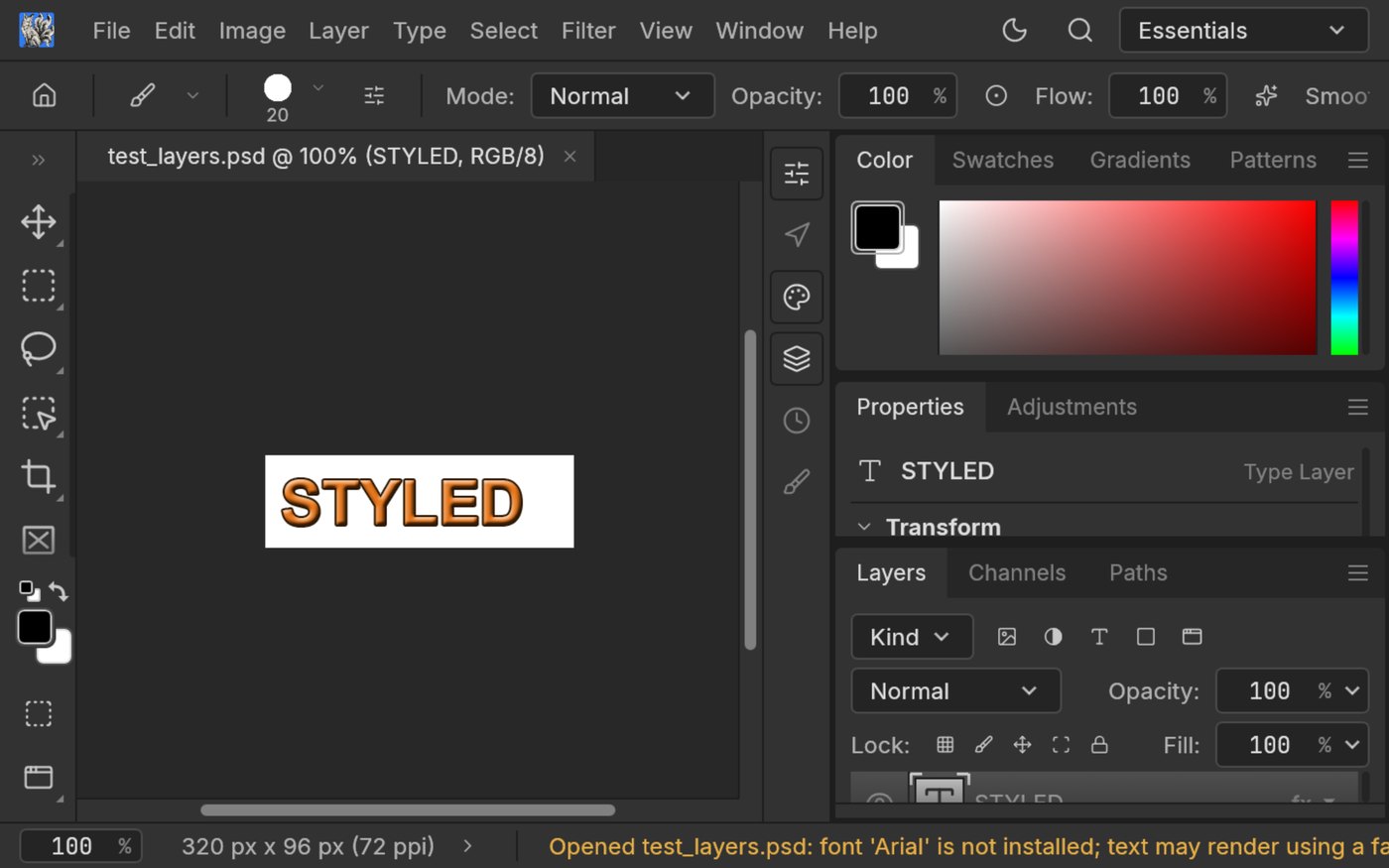
Above: the actual PhotoCraft Web v0.11.1 interface with a PSD open (screenshot from our test on 2026-10-21).
font 'Arial' is not installed; text may render using a fallback and renders the text in a fallback font, which throws the layout off. That matters a lot when you pick up someone else's PSD and keep editing it: always re-check text layers in desktop PS.So the verdict is: it can take over 80% of your everyday light retouching and compositing (in the browser, no install, works offline, native Rust speed), but it cannot yet carry a professional-grade deliverable. Don't treat it as a Photoshop replacement; treat it as a dress rehearsal and second tool next to Photoshop.
That paragraph is only a summary. The full hands-on account (every step of creating a document and loading a PSD, exactly how the font-fallback pitfall shows up, and the complete “what it can do / what it cannot do / who it suits” verdict) is in the blog post: “I Actually Ran PhotoCraft: What a 69k-Star Free ‘PS’ Can Really Do” →
How to get started
- Install in one click with ArtCraft Launcher (it matches your system automatically and handles updates later), or download it directly from the official site or GitHub using the buttons above.
- Run a file you don't care about through the whole flow (import → edit → export) to confirm the format is compatible and performance is acceptable.
- Only then move your daily workflow over; for important projects, always keep the original software or the original file as a fallback.
Who it suits / who it doesn't
- Good for: photographers, design students, and independent media creators who need retouching without an Adobe subscription; plus technical users who want to test whether open source can replace PS.
- Not for: heavy professional workflows that depend on a rich plugin ecosystem or need stable long-term deliverables (for now, stay with the original software).
Also worth a look
- Point-by-point comparison with the original app (what it can and cannot replace)
- LightCraft — a Lightroom alternative

Actively maintained
ArtCraft ships fast (mostly weekly releases). Scan the code to follow our WeChat account for version changes and hands-on notes.