ArtCraft Launcher Review: Install All 14 Tools From One Screen
The single front door to the whole ArtCraft suite: version numbers, update dates, and one-click install.
Independent third-party directory, not the official site. Always download from official channels.
What you're doing: Install all 14 ArtCraft tools in one go and keep them updated together
The Launcher is not a creation tool — it is an entry point. It has one job: save you from hunting down GitHub releases one at a time, matching your system, and unzipping installers. It puts all 14 tools on one screen with version numbers and update dates, and installs them in one click.
| What you will see on open | In our test, an app-store-style grid: 14 cards (CADCraft / DeckCraft / DesignCraft / EffectCraft / FigCraft / FilmCraft / GridCraft / LightCraft / PdfCraft / PhotoCraft / SoundCraft / VectorCraft / WordCraft plus the Launcher itself), each showing the tool name, a one-line positioning statement, the version number (e.g. v0.10.0), and the update date (e.g. Oct 17, 2026) |
|---|---|
| How it differs from downloading separately | It matches your system automatically (the page offers INSTALL FOR LINUX / macOS / Windows buttons) and keeps everything updated afterward; downloading separately means judging the architecture and package format yourself |
| Can it be hosted online? | The web build's wasm measured 9 MiB — **under Cloudflare Pages' 25 MiB per-file limit, so it can technically be hosted as a "click and it just runs" tool** |
- When the page opens, first scan the grid for the tool you want (all 14 are there, each card carrying a version number and update date, so you can judge whether a tool is still actively maintained)
- Click the INSTALL FOR <your system> button on a card to install it in one click (the button label follows the visitor's system)
- There is a search box at the top (Search apps) for finding tools by name, and a theme switcher in the top right
- Once installed, launch and update everything from the Launcher — no need to remember where each tool lives
When to switch to something else: If you only want one tool and only need it once, grabbing that tool's web build from its own release is faster (every tool page on this site has a web-build test). The Launcher's value is "installing several tools and keeping them updated together over time".
Hands-on test (2026-10-21, official web build v0.6.1)
Hands-on test of the official web build (Ubuntu locally plus artcraft-launcher-web-0.6.1.zip): the page opened normally, and here is what we actually saw.
- 14 tool cards on a single screen, each with the tool name, a one-line positioning statement, a version number (e.g. GridCraft v0.9.0, PdfCraft v0.10.0, PhotoCraft v0.11.1), and an update date (Oct 17 / Oct 19 / Oct 21, 2026) — one glance tells you which tools are still shipping
- Every card has INSTALL FOR LINUX / macOS / Windows buttons (they change with the visitor's system); clicking one downloads the installer for that platform
- There is a Search apps box at the top, and a theme switcher in the top right
- wasm measured 9 MiB (about 3 MiB gzipped) — under Cloudflare Pages' 25 MiB limit, so it can technically be hosted directly
- 0 JS errors on startup
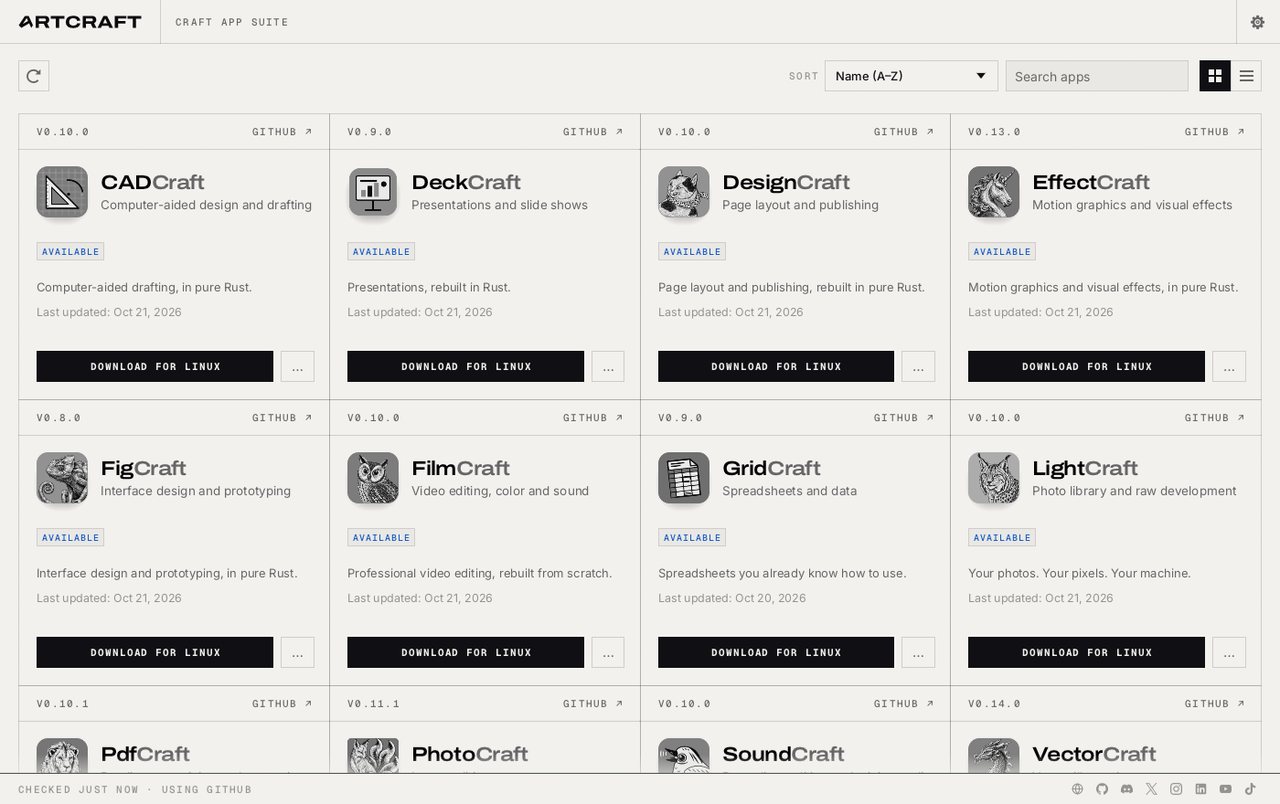
ArtCraft Launcher v0.6.1 official web build: all 14 tools on one screen with version numbers and update dates (screenshot from our 2026-10-21 test).
So the takeaway is: its value is not "one more piece of software" — it is answering "which ones should I install, and which are still being updated?" in one shot. The version number and update date on each card are a great selection signal: a tool whose update date stopped long ago probably is not well maintained.
Bottom line: It is the lowest-effort entry point: installing several tools, pick this; trying just one, go straight to that tool's web build.
Can it replace App launcher / app store — and who is it for?
It is the unified entry point for the ArtCraft suite (not a creation tool). Our test conclusion: the web build lists all 14 tools on one screen with version numbers and update dates and downloads them in one click, which makes it easy to see which tools are still actively maintained.
- Good for: people installing several ArtCraft tools who want them updated together; anyone who wants to see at a glance which of the 14 are still actively maintained.
- Not for: people who only want to try one tool once (downloading that tool's web build directly is faster); people who already have full professional software and do not need alternatives.
How to get started
- Open
artcraft-launcher-web-*.zipfrom the official release to browse the list first; to actually install, use the desktop Launcher (it matches your system automatically). - Or just click the INSTALL button for a given tool on the Launcher page and give installing it a try.
- Only want to try a feature? Go to the matching tool page on this site — it has the web-build test and no-install entry instructions.
Star counts and versions on this page were checked on GitHub on 2026-10-21.
Related apps
- PhotoCraft — Photoshop alternative (web build tested on this site)
- VectorCraft — Illustrator alternative (tested on this site)
- PdfCraft — Acrobat alternative (tested on this site)

Continuously updated
ArtCraft ships weekly. Scan the QR code to follow our WeChat account for release notes and hands-on updates.