Home / Design & Vector Tools / DesignCraft
DesignCraft: free alternative to Adobe InDesign — online / desktop
Positioned against InDesign. Maturity: in development. Our hands-on: the web build gets you into the full layout workspace with zero install; the welcome page offers paper presets directly, matching InDesign's form; but the UI is in English, and the 46 MiB wasm is heavy and exceeds the Cloudflare Pages single-file limit.
| Replaces | Adobe InDesign |
|---|---|
| License | Apache-2.0 (commercial use OK) |
| Runs on | online / desktop |
| Chinese UI | no (English UI) |
| Where files go | On your device (not uploaded) |
| Cost | All features free; no subscription, no account (open source) |
| Hands-on test | 2026-10-21 · v0.10.0 |
Hands-on test (2026-10-21, v0.10.0)
- No-install entry to the layout workspace: top menus File / Edit / View / Layout / Type / Tools / Tablet / Slide / Window / Help, tool strip on the left, Pages and Layers panels on the right
- The welcome page offers paper presets directly: Letter / Legal / Tabloid / Letter Half / A4 / A5, etc. (the screenshot shows a row of paper thumbnails + size labels), plus New / Open entries
- wasm measured at 46 MiB (~18 MiB gzipped) — exceeds the 25 MiB single-file limit of Cloudflare Pages; to make it 'use online', large files must be stored on R2
- 0 JS errors on launch
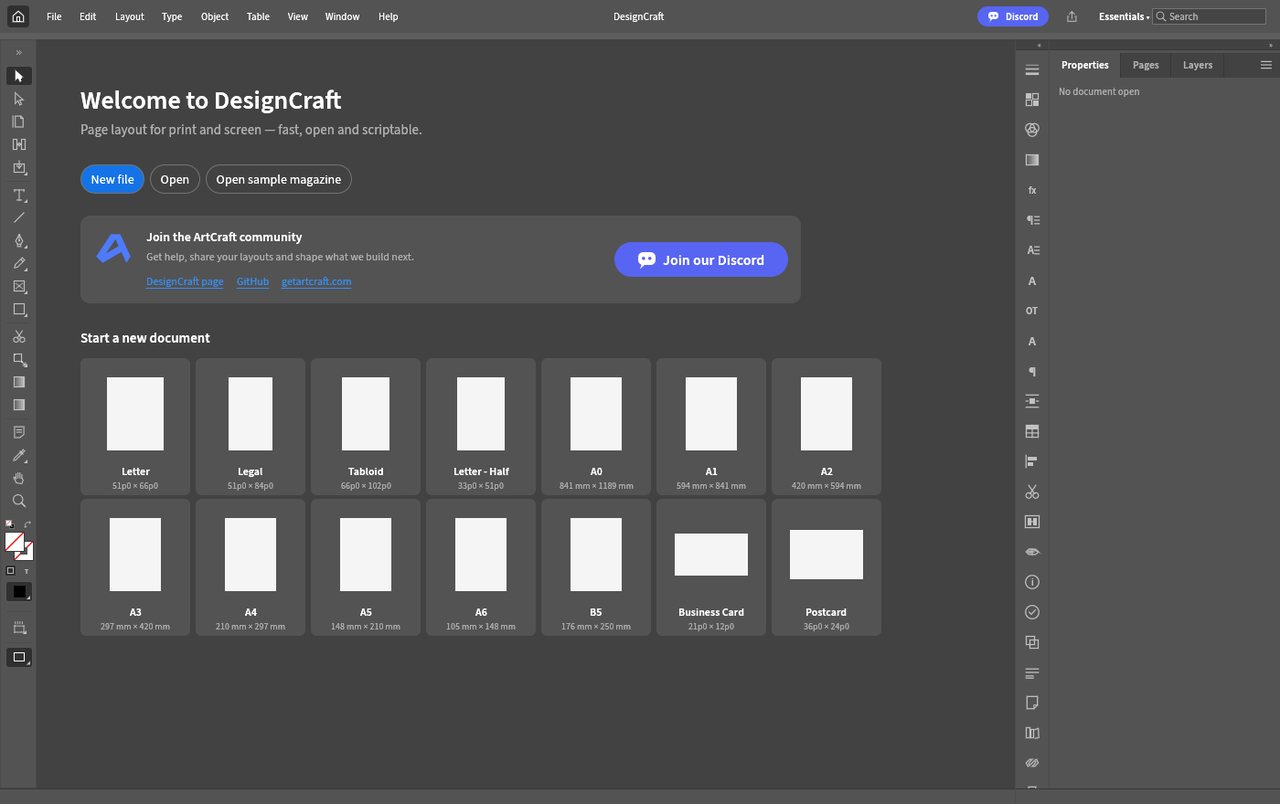
Bottom line: its product logic matches InDesign — set the paper size first, then lay out. For people who 'only lay out catalogs/handbooks a few times a year', zero install + ready-made paper presets is a real time-saver; but the English UI and the 46 MiB first load are two thresholds to cross.
Best for
- People who occasionally lay out catalogs/handbooks/single-page posters; people who want to try multi-page layout with zero install; people who can accept an English UI.
Not for
- Professional deliverables requiring print-grade color management and spot colors, complex imposition, or native package exchange with printers; poor network conditions (first load ~18 MiB).
Similar alternatives
How to get started
- Click "Use online" above — it runs in your browser, no signup required.
- Run the full workflow (open → edit → export) on a throwaway file first, to confirm format compatibility.
- Once you accept its limits, migrate your daily workflow; keep the original software as a fallback for critical deliverables.