VectorCraft Review: Vector Art You Can Open Right in the Browser
An Illustrator alternative: a vector workspace with paths, anchor points, boolean operations, and typesetting.
How it compares with Adobe Illustrator: see the item-by-item comparison →
Independent third-party directory, not the official site. Always download from official channels.
What you're doing: Draw a vector graphic / design an icon / produce a cover
VectorCraft is a vector editor, not a raster one, so its typical jobs are all of one kind: artwork that can scale indefinitely — logos, icons, illustrations, and layout comps. Here is the path we actually walked in testing.
| How do I pick a size? | Six quick presets: Letter 612×792 pt | A4 595.276×841.89 pt | Web 1920×1080 px | Mobile 390×844 px | Postcard 288×432 pt | Social square 1080×1080 px. There are also Legal, Tabloid, A3/A5/B4/B5 and other paper presets (units are pt, not px) |
|---|---|
| What does the interface look like | A dark, IDE-style three-column layout: toolbar on the left, canvas in the middle, properties panel on the right. The menu bar runs along the top, and the status bar at the bottom shows live X/Y coordinates (pt), zoom level, artboard count, render time, and frame rate |
| Do I need to install it? | No. The official web build (WebAssembly) runs directly in the browser — no install, no sign-up, files never leave your machine. In our test it opened with a double-click on a local Ubuntu machine |
| Can I use it online? | Yes, we host the official web build: wasm.cosmocat.dev/vectorcraft/ (free, no sign-up, files never leave your machine; work lives only in the browser and is gone when you close the tab) Interface: the localized UI is mostly correct, but 3 items in the top menu render as empty boxes Version: our hosted build is v0.14.0 (matching current upstream) |
- Download
vectorcraft-web-*.zipfrom the official release (unzip it and openindex.htmlwith any static server; the project also ships desktop builds as AppImage / .deb / .rpm) - On the welcome screen click New File → choose a preset (Letter / A4 / Web 1920×1080 / Mobile 390×844 / Postcard / Social square) → the right panel lets you change width, height, orientation, artboard count, bleed (top/bottom/left/right), and background (transparent or solid color)
- Click Create → you get a real document (the title bar reads
Untitled-1 @ 83.98% (CMYK/…)and the bottom shows the artboard count and X/Y coordinates) - The right-hand properties panel switches between shape / text / path / grid / stroke / fill / guides, and the bottom status bar shows live render time
When to switch to something else: Workflows that need a mature typesetting engine, CMYK print proofing, or a large third-party plugin ecosystem are still beyond VectorCraft — it targets a "free alternative", not a "professional replacement". Keep Illustrator as the reference for important deliverables.
Hands-on test (2026-10-21, official web build v0.14.0)
This time we didn't rework the official copy — we actually downloaded the official web build and ran it: local Ubuntu + vectorcraft-web-0.14.0.zip from the official release, opened in the browser, zero install and zero sign-up throughout.
- The interface localization is largely intact (the best of the three tools in this round): the welcome screen text, the new-file panel, the right-hand Properties and "no document open" panels, and the status bar readout "render 0.0ms / UI 2.7ms / 4 fps" all displayed correctly
- It really produced a document: click New File → choose a preset → Create gives
Untitled-1 @ 83.98% (CMYK/…), and the bottom status bar shows1 Artboard 1plus live X/Y coordinates (in pt) - Performance showed a clear step up: 4 fps on the welcome screen → 40–48 fps once the document was created, with the status bar reporting "render 4.3ms / UI 17ms". In other words it isn't merely "it opens" — once a document exists it is usable
- The size presets carry exact pt values: Letter 612×792 pt, A4 595.276×841.89 pt, Web 1920×1080 px, Mobile 390×844 px, Postcard 288×432 pt, Social square 1080×1080 px, Legal 612×1008 pt, Tabloid 792×1224 pt, A3 841.89×1190.551 pt, A5 419.528×595.276 pt, B4 708.661×1000.63 pt, B5 498.898×708.661 pt
- What the properties panel let us adjust: document width and height (the unit can be set to points), orientation, artboard count, bleed (top/bottom/left/right, 0 pt each), background (transparent/solid), artboard fill and stroke (1 pt), rulers and grid, guides, and preferences
- Known interface issues: in the top menu bar (File / Image / Text / Effect / Window / Help) there are 3 menu items that render as empty boxes, and a few labels in the status bar and properties panel are boxes too (e.g. "more settings", "preferences"). This is incomplete font coverage in the web build and does not block core operations
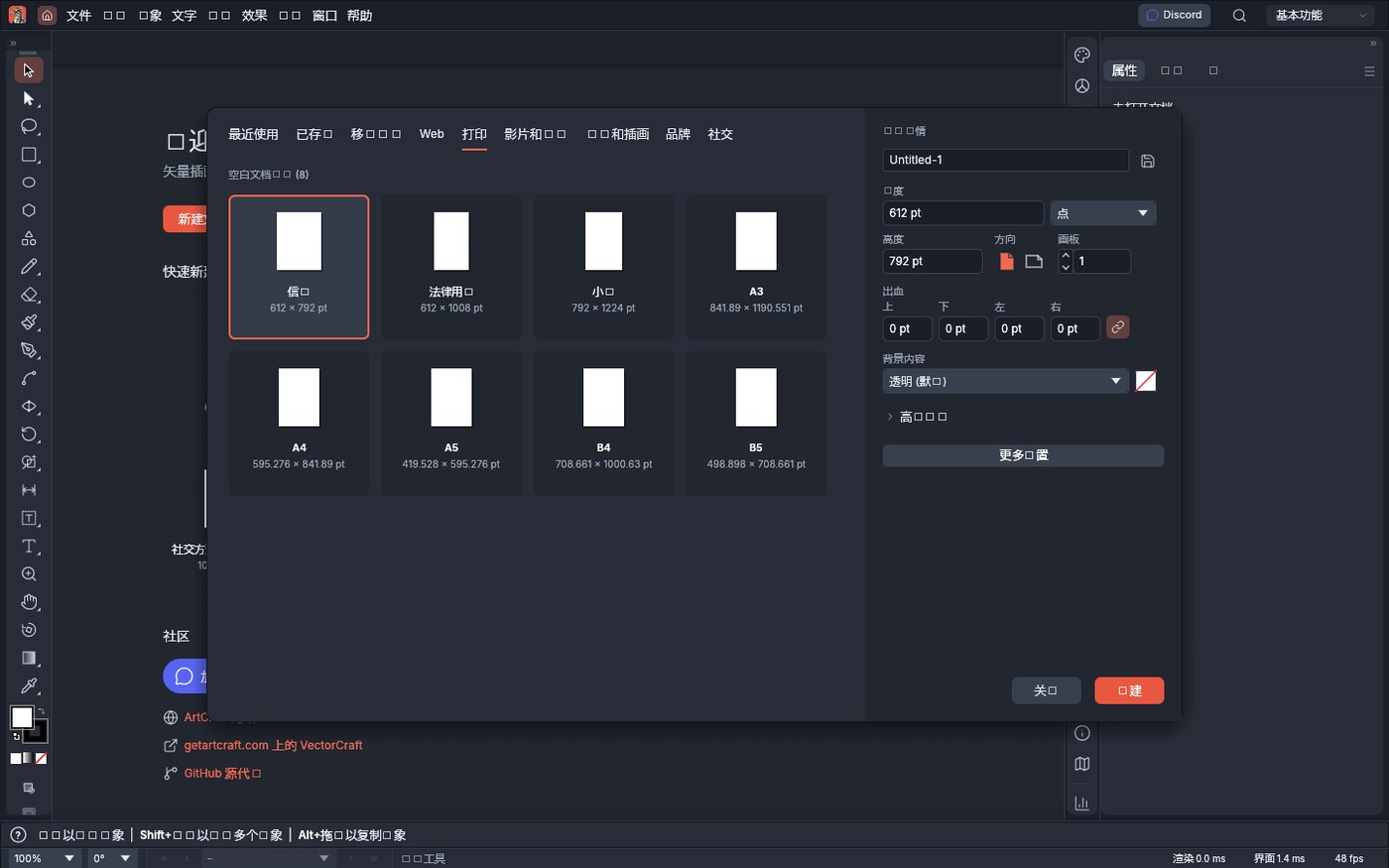
VectorCraft v0.14.0 official web build: the New File panel and document settings (screenshot from our test on 2026-10-21). Note the units are pt: Letter 612×792 pt, A4 595.276×841.89 pt, A3 841.89×1190.551 pt.
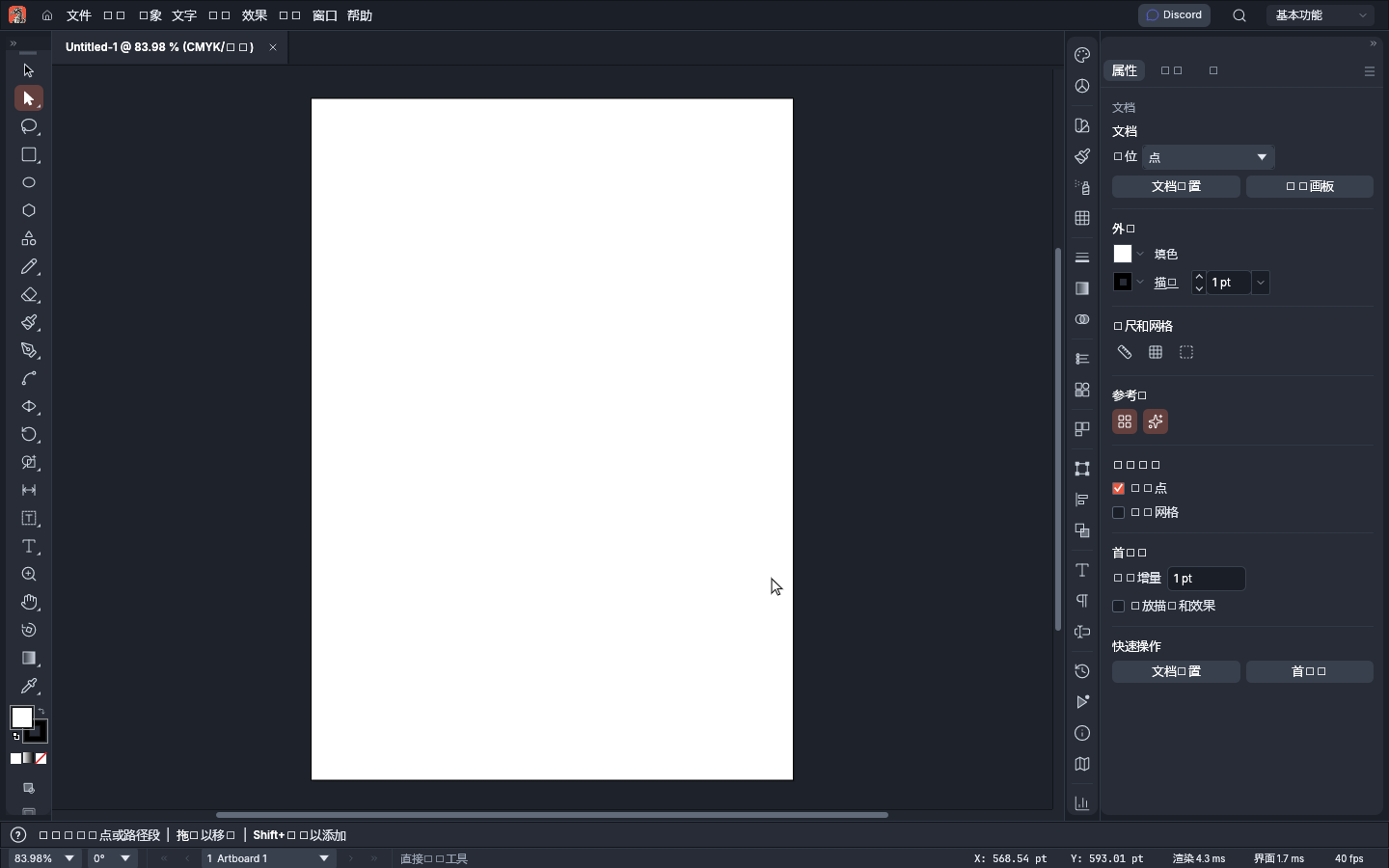
The real document after creation (Untitled-1 @ 83.98%, CMYK). The status bar shows live coordinates and "render 4.3ms / UI 17ms / 40 fps" — it is genuinely rendering, not a static image.
So can it replace Illustrator? For logos, icons, simple illustrations, and everyday layout comps — yes, it's good enough, and you skip the install. But "professional-grade delivery" is still out of reach. Don't treat it as an Illustrator substitute; treat it as a zero-install rehearsal space and second tool: get the idea and the layout working here, then finish in professional software.
Bottom line: It is the only web build in this round with a basically usable localized interface, and the one most worth trying first.
Can it replace Adobe Illustrator — and who is it for?
It is positioned as a vector editor taking on Illustrator, with current maturity listed as in development. What we found: the web build's localized UI mostly renders correctly, it really creates and renders documents (40+ fps), and it works well as a zero-install rehearsal space — but the typesetting engine, CMYK proofing, and plugin ecosystem still can't carry professional delivery.
- Good for: logos, icons, simple illustrations and social graphics; trying vector editing at zero cost first; a lightweight workspace where nothing needs installing and files never leave your machine.
- Not for: formal delivery that depends on a mature typesetting engine and professional output (print-grade CMYK proofing, complex typography), needs a large third-party plugin ecosystem, or requires team collaboration and version control.
How to get started
- Start with the web build: download
vectorcraft-web-*.zipfrom the official release and open it with any static server (the method we used in testing). No install, no sign-up, files never leave your machine. - Install the desktop build if you plan to stay: the official release offers Linux AppImage / .deb / .rpm / tar.gz, a macOS pkg, and a FreeBSD package, or use ArtCraft Launcher for a one-click install (it matches your system version and keeps everything updated later).
- Run a complete pass on a file you don't care about first (new → draw → export) to confirm format compatibility and acceptable performance before moving your daily workflow over; keep the original software or source files as a fallback for important projects.
Star counts and versions on this page were checked directly on GitHub on 2026-10-21; the web build downloads roughly 26 MB (gzipped) of wasm on first load, so allow for the wait.
Related apps
- PhotoCraft — Photoshop alternative (web version tested here)
- FigCraft — Figma alternative
- DesignCraft — InDesign alternative

Continuously updated
ArtCraft ships weekly. Scan the QR code to follow our WeChat account for release notes and hands-on updates.