EffectCraft review: a compositing workspace in the browser, timeline and layers included
An After Effects alternative for layer compositing, keyframe animation, effects and presets.
How it compares with Adobe After Effects: see the item-by-item comparison →
Independent third-party directory, not the official site. Always download from official channels.
What you're doing: Build a motion graphic / composite an effect shot / add titles and transitions to video
EffectCraft is a compositing and motion graphics tool, not an editor. The typical job: stack footage in layers, animate changes with keyframes and apply effect presets — title sequences, animated captions, composited effects.
| What you land in | Straight into the compositing workspace: a preview window in the middle, a project/effects panel on the left (Effects & presets), a layer list plus timeline below, and a top menu bar with File / Edit / Composition / Layer / Effect / Animation / View / Window / Help, plus playback controls and keyframe navigation along the bottom |
|---|---|
| Do I have to install anything | No. The official web build runs in the browser: no installation, no sign-up, and your files never leave your machine |
| Can I use it online | Yes — this site hosts the official web build: wasm.cosmocat.dev/effectcraft/ (free, no sign-up, files stay on your machine; projects live only in the browser and are lost when you close the tab) Interface: English Version: v0.13.0 on this site's online build; upstream is already at v0.14.0 (we are tracking it) |
- Download
effectcraft-web-*.zipfrom the official release, unzip it, and open it with any static server (or install the desktop build) - Create a composition and set its resolution and duration (a comp is an independent timeline — the central concept in any AE-style tool)
- Search or pick an effect in Effects & presets on the left and drag it onto a layer; add keyframes on the timeline below (the time ruler is visible and the playhead is draggable)
- Preview with the playback controls along the bottom, then export via Composition (check resolution and frame rate before you export)
When to switch to something else: For long-form editing, multi-track audio, professional colour grading, or renders beyond what browser memory allows, use AE, DaVinci Resolve or a local editing suite.
Hands-on test (2026-10-21, official web build v0.13.0)
Hands-on with the official web build (Ubuntu, effectcraft-web-0.13.0.zip, zero install).
- A complete compositing workspace with no install: preview window in the middle (we saw the EffectCraft logo animation), Projects and Effects & presets panels on the left, and a Layer list plus timeline below (with keyframe tracks and ruler)
- Top menu as observed: File / Edit / Composition / Layer / Effect / Animation / View / Window / Help, with a Render queue panel at bottom right
- The interface is in English, with no Chinese UI
- The wasm build measured 60 MiB (about 24 MiB gzipped) — the largest in this batch, and over Cloudflare Pages' 25 MiB limit
- 0 JS errors at startup; the preview area rendered correctly
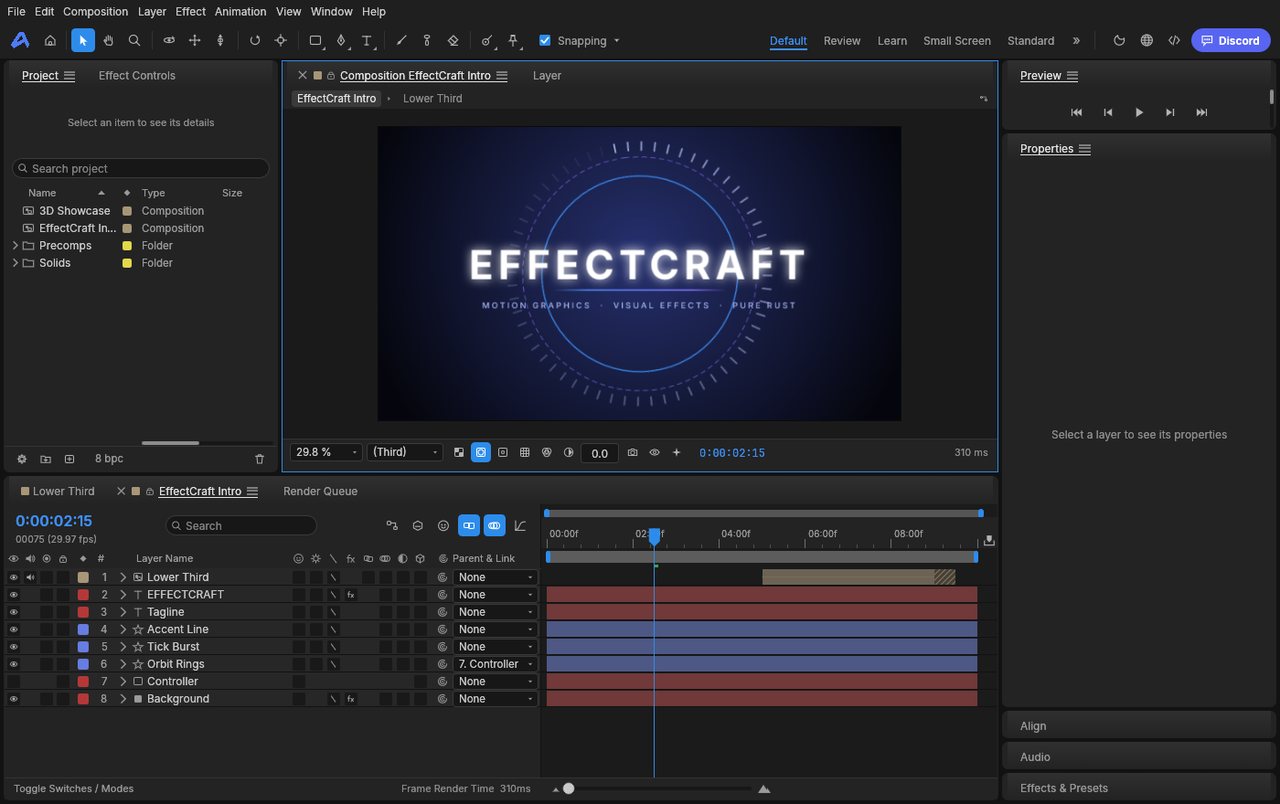
EffectCraft v0.13.0 official web build: zero-install access to the compositing workspace, with layers, timeline and effect presets all in place (screenshot taken on this site, 2026-10-21).
So the conclusion is: the shape of it is a full AE-style workbench (layers, timeline, effect presets and render queue all present), but the 60 MiB wasm is a hard barrier — this is no longer a "open it and have a look" download, it is a "set aside time to install" download. If you actually want to use it, install the desktop build.
Bottom line: The most complete feature set and the biggest download: it runs, but it is not something you open on a whim.
Can it replace Adobe After Effects — and who is it for?
It is positioned against After Effects, and its current maturity is in development. Our hands-on take: the web build opens a complete compositing workspace with no install (layers, timeline, effect presets, render queue), and the toolset is all there; but with a 60 MiB wasm payload and an English interface, we would suggest the desktop build for real work.
- Good for: title sequences, animated captions and composited effects, for people comfortable with an English interface who are willing to wait for the first load; students who want to try an AE-style workflow at zero cost.
- Not for: long-form editing, multi-track audio, professional colour grading, poor connections, or projects that need to interchange with AE project files.
How to get started
- Start with the web build (note the first load pulls about 24 MiB, so allow time): download
effectcraft-web-*.zipfrom the official release, unzip it, and open it with any static server. - For real work, install the desktop build: the official release ships Linux AppImage / .deb / .rpm, macOS and Windows; or use ArtCraft Launcher for a one-click install.
- Build a small 5-second comp first (one layer, one keyframe, one preset) to gauge performance before you decide whether to move a real project into it.
Star counts and versions on this page were checked against GitHub on 2026-10-21.
Related apps
- FilmCraft — Premiere Pro alternative
- SoundCraft — Pro Tools alternative
- LightCraft — Lightroom alternative

Continuously updated
ArtCraft ships weekly. Scan the QR code to follow our WeChat account for release notes and hands-on updates.