SoundCraft Review: A Multi-Track Audio Workstation With No Install
Built as a Pro Tools alternative. Multi-track recording, editing, mixing, and effects.
Independent third-party directory, not the official site. Always download from official channels.
What you're doing: Score a piece / mix a multi-track session / add sound to a video
SoundCraft is a multi-track digital audio workstation (DAW). Its typical job: line several tracks up on a timeline, set levels and pan, add effects, and export a finished mix — scoring, podcasts, video voiceover.
| What you get on open | In our test it drops you straight into the DAW workspace: a track list on the left (our test session had instrument tracks such as Kick / Snare / Timpani), a multi-track waveform timeline in the middle (each track showing real waveforms), transport controls at the top (play/stop/loop plus a timecode readout), and mixer channel strips on the right |
|---|---|
| Do you have to install it? | No. The official web build runs in the browser — no install, no sign-up, and your audio never leaves your machine |
| Can it be hosted online? | The web build's wasm measured 14 MiB — **under Cloudflare Pages' 25 MiB per-file limit, so it can technically be hosted as a "click and it just runs" tool** |
- Download
soundcraft-web-*.zipfrom the official release and open it with any static server (or install the desktop build) - Create tracks: add several tracks by instrument or part (our test session defaulted to drum-kit-style tracks — Kick/Snare/Timpani — which tells you it leans toward music production)
- Drag audio onto the matching track and use the transport controls at the top to play or loop; the timecode shows the current playback position (our test showed formats like 51 000 / 0:00)
- Set levels and pan, add effects, then export (confirm sample rate and bit depth before exporting)
When to switch to something else: For live recording (low-latency monitoring), a large plugin library (VST/AU), surround sound, or project interchange with Pro Tools, use a local DAW (Pro Tools / Reaper / Ardour).
Hands-on test (2026-10-21, official web build v0.10.0)
Hands-on test of the official web build (Ubuntu locally plus soundcraft-web-0.10.0.zip, zero install).
- A multi-track DAW workspace with no install: a track list on the left, a multi-track waveform timeline in the middle, transport controls and timecode up top, and a mixer area on the right
- The tracks in our test were instrument tracks: Kick / Snare / Timpani and so on (which tells you it targets music production by default, not podcasts or voiceover)
- The waveforms really rendered: genuine audio waveforms were visible on multiple tracks (not placeholder images), with tracks distinguished by color
- wasm measured 14 MiB (about 6 MiB gzipped) — among the lightest in this batch, under Cloudflare Pages' 25 MiB limit, and the easiest to turn into a "click and it just runs" tool
- 0 JS errors on startup; the waveforms and timeline rendered correctly
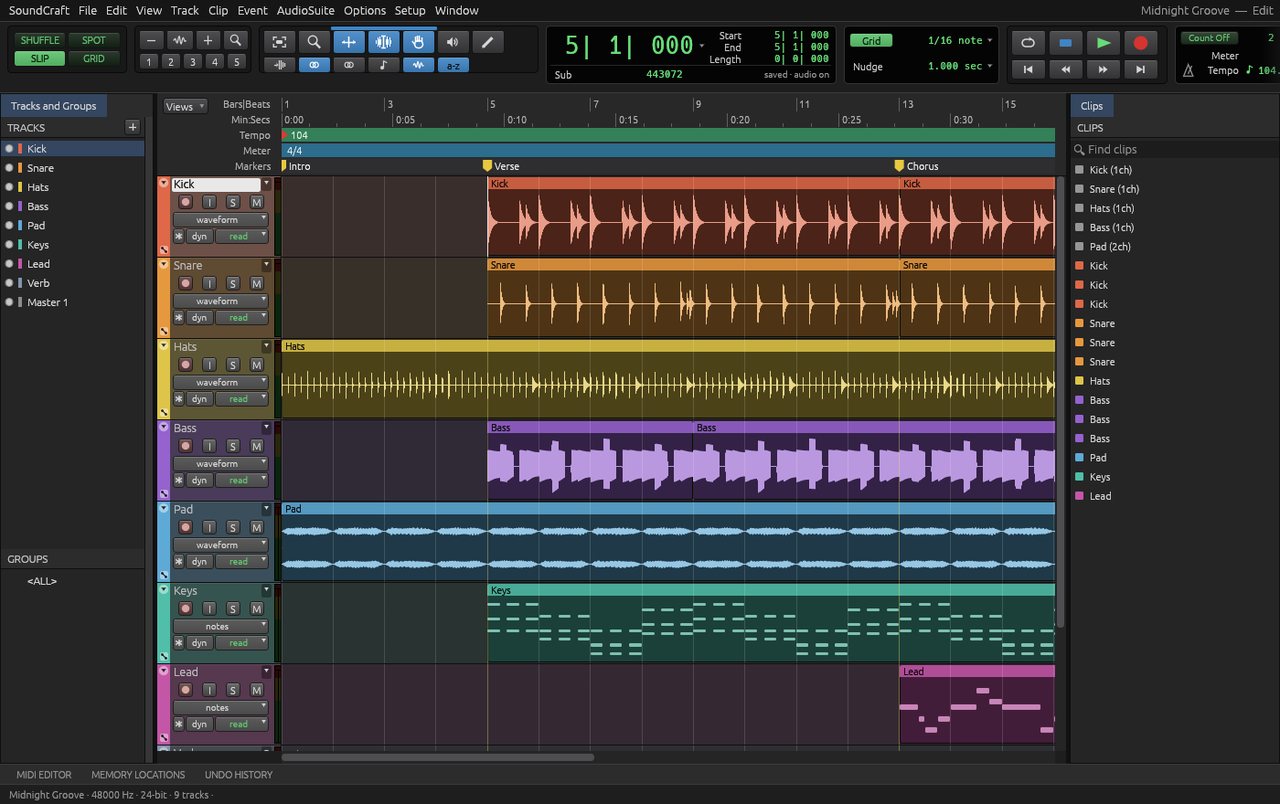
SoundCraft v0.10.0 official web build: a multi-track DAW with no install — tracks, waveforms, transport, and mixer all present (screenshot from our 2026-10-21 test).
So the takeaway is: this is the lightest, fastest-loading, and easiest to host tool in the batch (14 MiB), and it barely stuttered in testing. Its default tracks are drums and instruments, though, which tells you it is aimed at music production; you can use it for podcasts or voiceover, but you will need to restructure the tracks yourself.
Bottom line: The lightest and fastest of the bunch: solid for music-oriented multi-track work — for live recording, use a local DAW.
Can it replace Pro Tools / DAW — and who is it for?
Positioning: a Pro Tools alternative. Current maturity: in development. Our test conclusion: the web build needs no install and opens a complete multi-track DAW (tracks + real waveforms + transport + mixer), and its wasm is only 14 MiB, the fastest to load. But the UI is English, and live recording is capped by Web Audio latency.
- Good for: music-oriented multi-track scoring and editing, adding sound to video, and anyone who wants to try a DAW workflow with zero install; it even works on a poor connection (14 MiB).
- Not for: live recording (low-latency monitoring), heavy VST/AU plugin use, surround sound, or project interchange with Pro Tools.
How to get started
- Try the web build first (the lightest in this batch at 14 MiB, and the fastest to load): download
soundcraft-web-*.zipfrom the official release and open it with any static server. - If you are serious about making music, install the desktop build: the official release ships Linux AppImage / .deb / .rpm, plus macOS and Windows; or use ArtCraft Launcher for one-click install.
- Start with a 30-second multi-track experiment (3 tracks → align → set levels → export), confirm the latency and export formats are acceptable, then move on to real projects.
Star counts and versions on this page were checked on GitHub on 2026-10-21.
Related apps
- FilmCraft — Premiere Pro alternative
- EffectCraft — After Effects alternative
- PhotoCraft — Photoshop alternative (tested on this site)

Continuously updated
ArtCraft ships weekly. Scan the QR code to follow our WeChat account for release notes and hands-on updates.