CADCraft Review: Open a Browser Tab, Land in a 3D Modeling Workspace
Built as an AutoCAD alternative. Parametric sketches, 3D modeling, and engineering drawing annotations.
Independent third-party directory, not the official site. Always download from official channels.
What you're doing: Draft a part sketch / build a 3D model / produce an engineering drawing
CADCraft is parametric CAD, and its job is narrow: mechanical and engineering geometry that has to be dimensionally exact and editable through parameters — part drawings, assemblies, engineering annotations.
| What you get on open | In our test it drops you straight into a 3D modeling workspace: three workspaces across the top (Modeling / Sketching / Annotate), a 3D viewport in the middle (with a ViewCube and Top/Front/Right/ISO view buttons), Layers and Properties panels on the right, and a full drawing toolbar on the left |
|---|---|
| Do you have to install it? | No. The official web build runs in the browser — no install, no sign-up, and your files never leave your machine |
| Can it be hosted online? | The web build's wasm measured 21 MiB — **under Cloudflare Pages' 25 MiB per-file limit, so it can technically be hosted as a "click and it just runs" tool** |
- Download
cadcraft-web-*.zipfrom the official release, unzip it, and openindex.htmlwith any static server (or install the desktop build: AppImage / .deb / .rpm) - Pick a workspace first: Sketching for 2D sketches → Modeling to extrude or revolve them into 3D solids → Annotate for engineering drawing callouts
- Change the view with the ViewCube or the Top / Front / Right / ISO buttons in the top right; edit parameters in the Properties panel on the right (changing a parameter rebuilds the geometry — that is the fundamental difference between parametric CAD and ordinary drawing)
- Manage layers in the Layers panel on the right (visibility, locking)
When to switch to something else: For assembly interference checks, sheet metal, advanced surface modeling, standard-part libraries, or exchanging native formats with other CAD tools, use desktop professional software for now.
Hands-on test (2026-10-21, official web build v0.10.0)
The official web build really does run: Ubuntu locally plus the official cadcraft-web-0.10.0.zip release, opened in a browser — zero install, zero sign-up.
- A full 3D modeling workspace with no install: three workspaces (Modeling / Sketching / Annotate), a 3D viewport with ViewCube and Top/Front/Right/ISO view buttons, Layers and Properties panels, and a complete drawing toolbar on the left (line/rectangle/circle/arc/fillet/spline/dimension/measure, and more)
- The interface is in English (File / Edit / View / Insert / Tools / Draw / Constraints / Modify / Window / Help); no Chinese UI
- wasm measured 21 MiB (about 7 MiB gzipped) — under Cloudflare Pages' 25 MiB per-file limit, which means tools like this can technically be hosted as "click and it just runs"
- 0 JS errors on startup, and the 3D viewport rendered correctly (dark gray background with a grid floor)
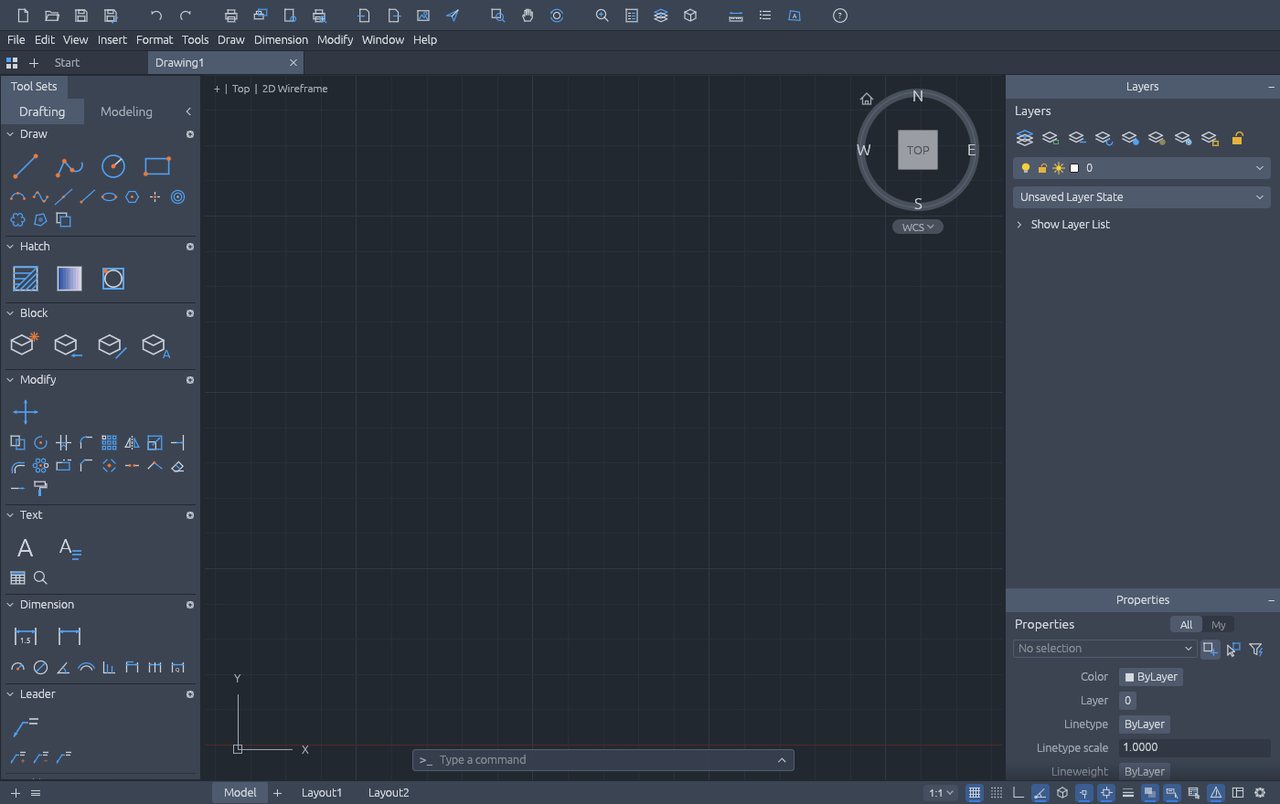
CADCraft v0.10.0 official web build: a 3D modeling workspace with no install (screenshot from our 2026-10-21 test).
So the takeaway is: it gets you into parametric CAD with zero install. For anyone who only occasionally needs a part drawing and does not want to install a 2 GB application for it, that entry point is genuinely valuable. But the UI is English and heavy on jargon, so the first time through, follow the official sample and work through sketch constraints once.
Bottom line: It is the most professional of this round's tests — and it genuinely runs, provided you can live with an English interface.
Can it replace AutoCAD — and who is it for?
Positioning: an AutoCAD alternative. Current maturity: in development. Our test conclusion: the web build needs no install and opens a complete 3D modeling workspace (three workspaces + ViewCube + layers + properties), and the functionality is real — but the UI is English and dense with professional terminology.
- Good for: engineers, students, and makers who occasionally need a part sketch or a simple 3D model; anyone who wants to try parametric CAD with zero install.
- Not for: formal engineering deliverables needing assembly interference checks, sheet metal, advanced surfaces, standard-part libraries, or native-format exchange with other CAD tools.
How to get started
- Try the web build first: download
cadcraft-web-*.zipfrom the official release and open it with any static server. No install, no sign-up, and your files stay local. - If you will use it long term, install the desktop build: the official release ships Linux AppImage / .deb / .rpm / tar.gz, plus macOS and Windows; or use ArtCraft Launcher for one-click install.
- Run one unimportant drawing through the whole flow first (sketch → extrude → export) to confirm the constraint behavior and export formats match your expectations before starting a real project.
Star counts and versions on this page were checked on GitHub on 2026-10-21; the web build's first load pulls about 7 MiB of wasm (gzipped).
Related apps
- FigCraft — Figma alternative
- DesignCraft — InDesign alternative
- VectorCraft — Illustrator alternative (tested on this site)

Continuously updated
ArtCraft ships weekly. Scan the QR code to follow our WeChat account for release notes and hands-on updates.