FigCraft Review: A Zero-Install Design Canvas with Design, Prototype and Inspect Modes
A Figma alternative for UI design, prototype linking, and developer handoff.
Independent third-party directory, not the official site. Always download from official channels.
What you're doing: Draw an app screen / design a set of pages / wire up a clickable prototype
FigCraft is a UI design tool. Typical jobs: lay out components on an infinite canvas, set sizes and spacing, wire up prototypes, and hand off annotations — app and web UI mockups.
| What you see when it opens | It goes straight into the design canvas: a Pages panel on the left (Page 1 already created), a Design / Prototype / Inspect mode switcher at the top, a properties panel on the right (Stroke 1/100, Fill, Export Export page as PNG), and a toolbar at the bottom |
|---|---|
| Do I need to install it? | No. The official web build runs in the browser — no install, no sign-up, and your files never leave your machine |
| Can I use it online? | Yes, we host the official web build: tools.cosmocat.dev/figcraft/ (free, no sign-up, files never leave your machine; work lives only in the browser and is gone when you close the tab) |
| Can I use it online? | Yes, we host the official web build: tools.cosmocat.dev/figcraft/ (free, no sign-up, files never leave your machine; work lives only in the browser and is gone when you close the tab) Interface: English Version: our hosted build is v0.8.0; upstream is already at v0.9.0 (we are tracking it) |
- Download the official
figcraft-web-*.ziprelease, unzip it, and serve it with any static server (or install the desktop app) - Create pages in the Pages panel on the left (one page = one screen or one set of comps). Use the bottom toolbar to draw rectangles, ellipses, text, and frames (a Frame is the core container in the Figma family — its size is your screen size)
- Use the right-hand properties panel to adjust Stroke width and Fill. Switch to Prototype at the top to wire interactions, or Inspect to read handoff specs
- Export: the Export panel on the right (in our test it offered Export page as PNG)
When to switch to something else: If you need real-time collaboration, cloud team libraries, design-system management, or a plugin ecosystem, stay with Figma. FigCraft suits solo, local mockups.
Hands-on test (2026-10-21, official web build v0.8.0)
Hands-on with the official web build (local Ubuntu + figcraft-web-0.8.0.zip, zero install and zero sign-up).
- Straight into the design canvas with no install: Pages panel on the left (Page 1), properties panel on the right, toolbar at the bottom, a white canvas in the middle and visible toolbar icons (select, frame, shapes, text and more)
- All three modes — Design / Prototype / Inspect — were present in testing (switcher at top right). This is the signature three-part structure of the Figma family: design, then wire the prototype, then hand off specs
- Properties panel, as tested: Stroke shows
1 / 100, Fill has a toggle, and the Export panel includes Export page as PNG - The wasm measured 23 MiB (about 9 MiB gzipped) — just under Cloudflare Pages' 25 MiB limit
- The interface language is English, with no localized version
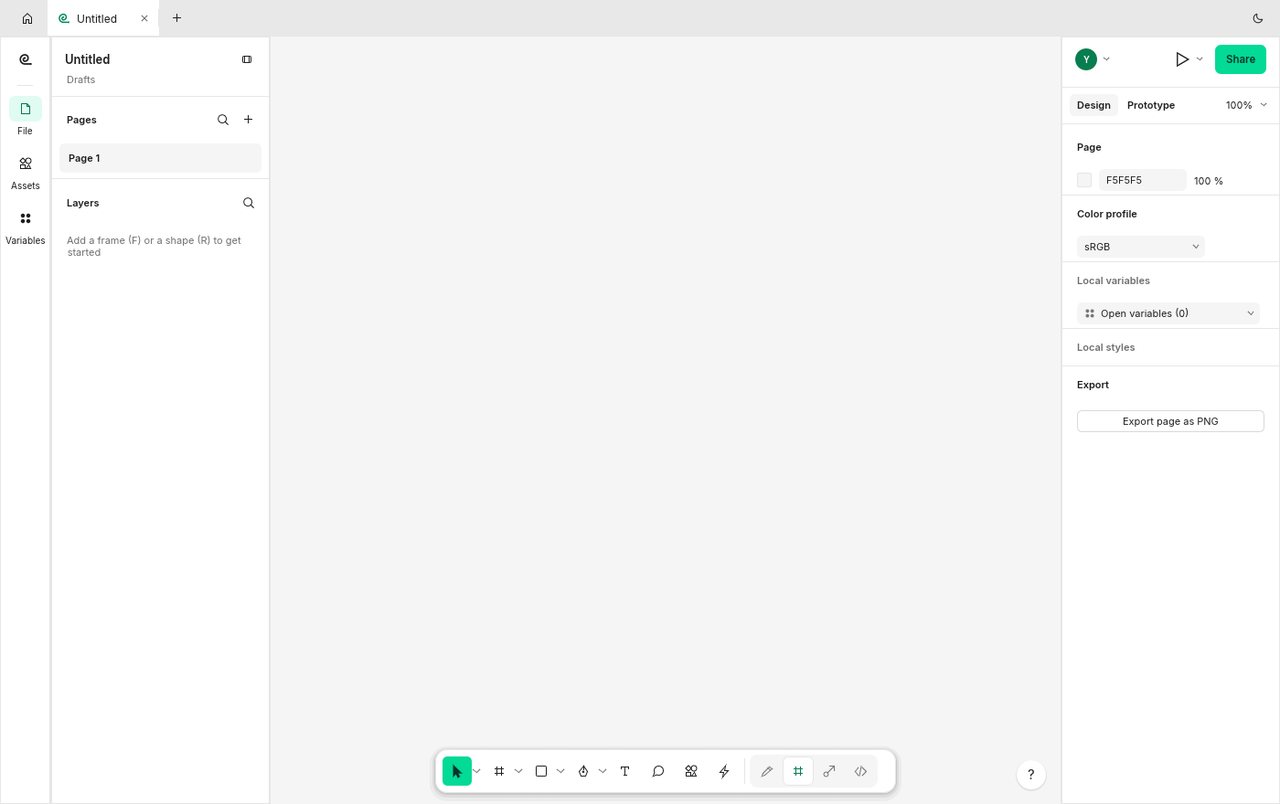
FigCraft v0.8.0 official web build: straight into the design canvas with no install, with all three Design/Prototype/Inspect modes (screenshot from our test on 2026-10-21).
So the conclusion is: for someone who draws UI mockups alone and works in Figma habits, this is the closest free local alternative — the core three-part skeleton (Design/Prototype/Inspect) is all there. But it has no cloud collaboration, and the project itself labels it early alpha, so don't make it the only source for team deliverables.
Bottom line: One of the best options for solo UI mockups: right skeleton, small footprint (it can run on Pages), but collaboration is a hard gap.
Can it replace Figma — and who is it for?
It is positioned against Figma. Current maturity: early alpha (the project's own least mature tier). What we found: the web build enters a design canvas with no install, the full Design/Prototype/Inspect skeleton is present, and both the properties panel and export work — but there is no cloud collaboration and the interface is English-only.
- Good for: drawing app or web UI mockups on your own, trying a Figma-style workflow with zero install, and anyone comfortable with an English interface.
- Not for: team workflows that need real-time collaboration, a shared component library, design-system management, or a plugin ecosystem.
How to get started
- Start with the web build: download the official
figcraft-web-*.ziprelease and open it with any static server. No install, no sign-up. - For long-term use, install the desktop app: the official release ships Linux AppImage / .deb / .rpm, macOS, and Windows builds, or use ArtCraft Launcher for a one-click install.
- Draw one real screen first (set the frame size, place components, adjust stroke and fill, export a PNG) to see whether it is good enough, then decide whether to move a project over.
Star counts and versions on this page were checked directly on GitHub on 2026-10-21.
Related apps
- DesignCraft — InDesign alternative
- VectorCraft — Illustrator alternative (tested here)
- LightCraft — Lightroom alternative

Continuously updated
ArtCraft ships weekly. Scan the QR code to follow our WeChat account for release notes and hands-on updates.