DesignCraft Review: Start Laying Out an A4 Page With No Install
Built as an InDesign alternative. Page layout, master pages, and print output.
Independent third-party directory, not the official site. Always download from official channels.
What you're doing: Lay out an A4 document / design a one-page poster / produce a multi-page brochure
DesignCraft is a page layout tool — not illustration, and not slides. Its typical job: multi-page work with margins, laid out against a fixed paper size — manuals, brochures, one-page posters, multi-page reports.
| What you get on open | In our test, a welcome screen with new-document presets: "Welcome to DesignCraft" in the top right, New / Open buttons, a "Start a new document" row of paper presets (Letter / Legal / Tabloid / Letter Half / A4 / A5 / more), and Pages and Layers panels at the bottom |
|---|---|
| Do you have to install it? | No. The official web build runs in the browser — no install, no sign-up, and your files never leave your machine |
| Can you use it online? | Yes — we host the official web build: wasm.cosmocat.dev/designcraft/ (free, no sign-up, files stay local; your work lives only in the browser and is gone when you close the tab) Interface: English Version: our hosted build is v0.10.0; upstream is already at v0.11.0 (we are tracking it) |
- Download
designcraft-web-*.zipfrom the official release and open it with any static server (or install the desktop build) - On the welcome screen, pick a paper preset under "Start a new document" (A4 = 210×297mm; for print work, confirm bleed and margins first)
- Use the Layout menu up top to create master pages and pages, the Pages panel on the right to add and reorder pages, and the Layers panel to organize content by layer
- When the layout is done, export via File → Export (for print delivery, export a PDF and check that fonts are embedded)
When to switch to something else: For print-grade color management (CMYK proofing / spot colors / trapping), complex imposition, or exchanging native packages with a print shop, use InDesign or Scribus for now.
Hands-on test (2026-10-21, official web build v0.10.0)
Hands-on test of the official web build (Ubuntu locally plus designcraft-web-0.10.0.zip, zero install, zero sign-up).
- A layout workspace with no install: File / Edit / View / Layout / Type / Tools / Tablet / Slide / Window / Help menus along the top, a tool strip on the left, and Pages and Layers panels on the right
- The welcome screen hands you paper presets directly: Letter / Legal / Tabloid / Letter Half / A4 / A5 and more (our screenshot shows a row of paper thumbnails with size labels), plus New / Open entry points
- The interface language is English; there is no Chinese UI
- wasm measured 46 MiB (about 18 MiB gzipped) — over Cloudflare Pages' 25 MiB limit, so running it directly online would mean moving large files to R2
- 0 JS errors on startup
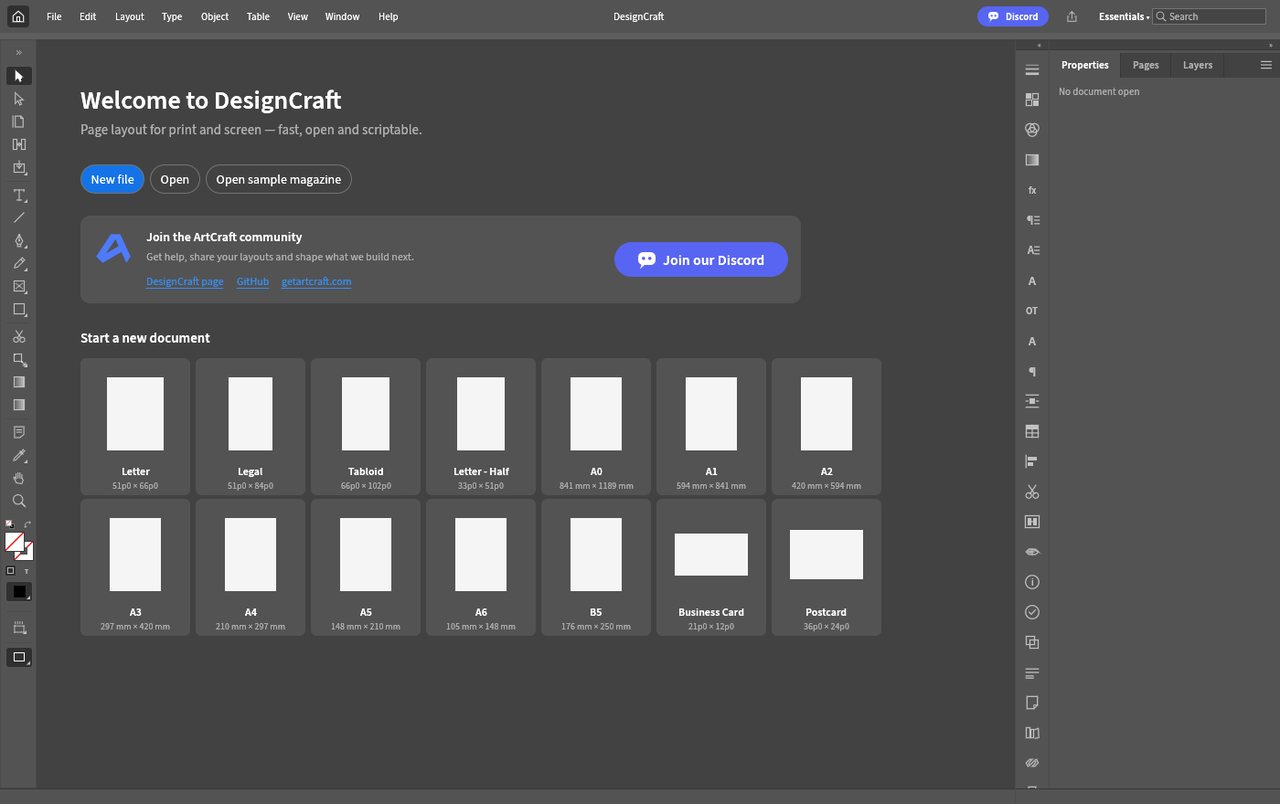
DesignCraft v0.10.0 official web build: paper presets right on the welcome screen (screenshot from our 2026-10-21 test).
So the takeaway is: the product logic matches InDesign — choose the paper first, then lay out. For someone who lays out a brochure or manual only a few times a year, no install plus ready-made paper presets is real time saved. But the English UI and the 46 MiB first load are two hurdles.
Bottom line: It runs and the feature shape is right — but it is one of the heaviest here; for long-term use, install the desktop build.
Can it replace Adobe InDesign — and who is it for?
Positioning: an InDesign alternative. Current maturity: in development. Our test conclusion: the web build needs no install and opens a complete layout workspace, with paper presets right on the welcome screen — the shape matches InDesign. But the UI is English, and the 46 MiB wasm is heavy and over the Pages per-file limit.
- Good for: people who occasionally lay out a brochure, manual, or one-page poster; anyone who wants to try multi-page layout with zero install; users comfortable with an English UI.
- Not for: professional work needing print-grade color management and spot colors, complex imposition, or native package exchange with a print shop; poor network conditions (an 18 MiB download on first load).
How to get started
- Try the web build first: download
designcraft-web-*.zipfrom the official release and open it with any static server. No install, no sign-up. - For long-term use, install the desktop build: the official release ships Linux AppImage / .deb / .rpm, plus macOS and Windows; or use ArtCraft Launcher to install everything in one click and keep it updated together.
- Run one unimportant piece of content through "set paper → lay out → export PDF" first, confirm font embedding and page size match expectations, then move on to real projects.
Star counts and versions on this page were checked on GitHub on 2026-10-21; the web build's first load pulls about 18 MiB (gzipped).
Related apps
- FigCraft — Figma alternative
- DeckCraft — PowerPoint alternative
- LightCraft — Lightroom alternative

Continuously updated
ArtCraft ships weekly. Scan the QR code to follow our WeChat account for release notes and hands-on updates.