WordCraft Review: It Opens Straight Into a Template Library
A Word rival. A document workspace for layout, styles, tables, review, and references.
Independent third-party directory, not the official site. Always download from official channels.
What you're doing: Write a document / build a resume / produce a report / edit someone else's draft
WordCraft's core job is turning plain text into a properly laid-out document. Its approach differs from other tools: you do not start from a blank page, you start from a template—the app opens on a wall of templates, and you pick the closest one.
| What you see when it opens | In testing it was a template library: a greeting plus template thumbnails (our screenshots show The Open Studio Handbook / Your Name / Alex Rivers / Blank Document), 11 feature entries down the left, and a Discord link at the bottom |
|---|---|
| What it can do | Document editing, layout styles, tables, review, references and more (the 11 entries on the left); it also offers Agent / MCP integration (the official docs mention both a CLI and an MCP path) |
| Can you skip installing it? | Yes. The web version runs in the browser—no install, no sign-up, and files never leave your machine; official releases also ship desktop builds for macOS / Windows / Linux / FreeBSD |
| Can you use it online? | Yes—we host the official web build: wasm.cosmocat.dev/wordcraft/ (free, no sign-up, files stay local; your work lives only in the browser and disappears when you close the tab) Interface: English renders fine; template names show as boxes Version: our hosted build is v0.9.0 (matches upstream latest) |
- Download
wordcraft-web-*.zipfrom the official release (unzip it and openindex.htmlwith any static server), or install the desktop AppImage / .deb / .rpm / pkg - It opens straight into the template library: start with the row of templates under the greeting (we saw four: The Open Studio Handbook / Your Name / Alex Rivers / Blank), pick the one closest to your task, or choose a blank document and start from scratch
- Work from the left sidebar: New / Open / Recent / Templates / Export / Print / Review / Find / Styles / Settings and a few more—11 entries in all (note that in the web version these labels render as boxes, so you have to go by the icons)
- When you are done, export from the top toolbar (the official docs also describe CLI and MCP routes for automation)
When to switch to something else: If what you want is a Word replacement you can use directly in a Chinese-language environment, the current web version is not it (there is no Chinese UI). If you need academic-grade reference management, complex field codes, tracked-changes collaboration, or professional typesetting standards, stick with Word or WPS for now.
Hands-on test (2026-10-21, official web build v0.9.0)
This time we actually got the official web build running (local Ubuntu + the official wordcraft-web-0.9.0.zip, opened in a browser, zero installation). Here is what we saw.
- The very first screen is a template library, not a blank editor: “Good morning” at the top, then four template thumbnails—The Open Studio Handbook (a content-heavy handbook template), Your Name (a resume / personal card template), Alex Rivers (a profile template with Education / Experience / Education / Skills / Contact), and Blank Document. Each template has a Chinese name underneath, but it renders as empty boxes
- 11 feature entries down the left (icons recognizable, labels boxes): Home / New / Open / Recent / Templates / Export / Print / Review / Find / Styles / Settings
- Every Chinese label renders as a box (sidebar labels show
??, template names□□□□), while English is fine (“Good morning”, the English body text inside templates, the Discord entry) - We ruled out “it is my machine”: the same browser renders Chinese in ordinary HTML perfectly (Noto Sans CJK SC and AR PL UMing CN both work), so the tofu boxes come from the web build not bundling a Chinese font
- How it differs from PdfCraft: both web builds lack Chinese fonts, but PdfCraft's feature entries all have icons and use a toolbar-style layout, so you can identify functions by icon; WordCraft opens on a template-library home page, so not being able to read template names directly hurts your ability to pick one—that is the practical difference
- wasm size: about 42 MB (roughly 16 MB gzipped); the first load takes a while
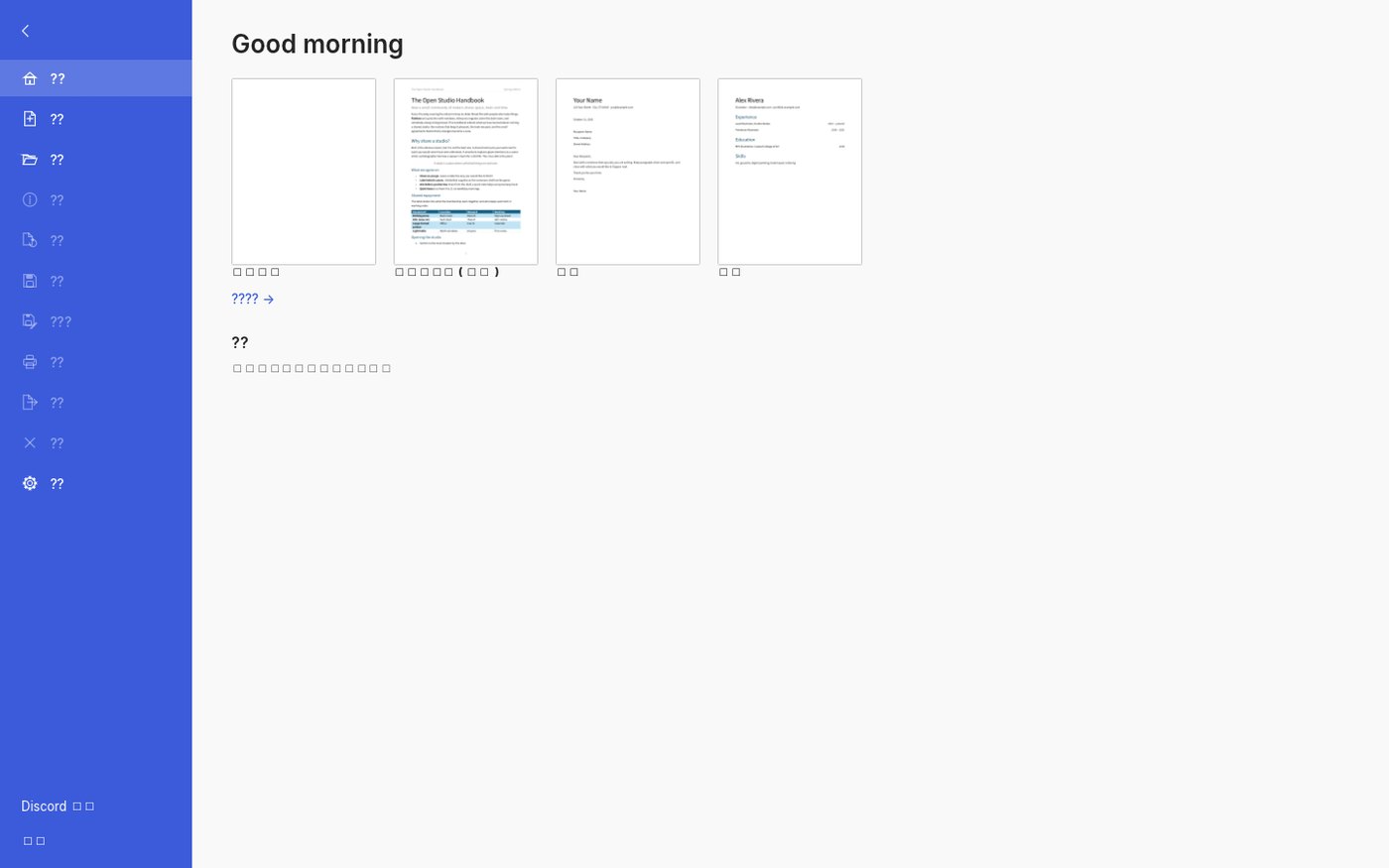
Home screen of the official WordCraft v0.9.0 web build: the template library is fully designed (all four thumbnails include real content previews), but [all 11 sidebar labels and every template name render as boxes] (screenshot from our test, 2026-10-21).
So the verdict is: WordCraft's web build gets the product idea right (templates first, usable the moment it opens), and the library itself is more complete than its peers—all four templates have real content previews, not empty shells. But for Chinese users this web build is “visible but unusable”: template names and feature names are all boxes, so even choosing a template means guessing from the English.
Bottom line: It is a tool with a solid template system but no Chinese UI in the web build: if you want the templates, try the desktop app; if you want the full feature set, wait for the Chinese UI to be fixed.
Can it replace Microsoft Word — and who is it for?
Positioning-wise it targets Word. The official repo does not give a clear maturity label (status shows as unknown). Our test conclusion: the web build is a template-first product and the library is well built; but the Chinese UI is all boxes—template names and feature names are unreadable—so for Chinese users it is currently “visible but unusable.”
- Good for: people who want an existing template they can edit right away (resumes, handbooks, profile pages); users comfortable with an English UI; anyone who needs a lightweight document tool with no install and no files leaving the machine; people who want to try CLI / MCP to let an agent process documents in bulk.
- Not for: users who need a Chinese UI (the web build has no Chinese font); formal deliverables that require academic-grade reference management, complex field codes, multi-user tracked changes, or professional typesetting standards.
How to get started
- To preview the templates: download
wordcraft-web-*.zipfrom the official release, unzip it, and openindex.htmlwith any static server. No install, no sign-up, and files stay on your machine. - For regular use, install the desktop build: official releases cover macOS pkg, Windows, Linux AppImage / .deb / .rpm / tar.gz, and FreeBSD; or use ArtCraft Launcher for a one-click install (it picks the right build for your OS and keeps everything updated).
- For automation: the official docs describe CLI and MCP integration paths, which suit letting an agent generate or rewrite documents in bulk.
- Run it first on something unimportant (pick a template, edit, export) to confirm format compatibility and acceptable performance before moving your daily workflow over.
Star count and version on this page were checked against GitHub on 2026-10-21; the web build's first load downloads roughly 16 MB (gzipped) of wasm.
Related apps

Continuously updated
ArtCraft ships weekly. Scan the QR code to follow our WeChat account for release notes and hands-on updates.